
SUBSCRIBE TO THE NEWSLETTER
Get the latest insights on LLM and search visibility to help your business get cited.
AI Visibility Tools Are Failing You Profoundly
Learn which BOFU prompts to track and the ones to avoid, so you can attribute revenue to your campaigns.
BrightonSEO Sip and Search Tutorial
Turn Your Sales Pages Into Citation-Worthy Assets
All the tools, formulas, and frameworks from Garrett: BrightonSEO talk in one place.

How to Track and Fix BOFU Visibility in LLMs
Most “AI visibility” tools flood you with synthetic queries focused on brand, not sales. Follow this process to identify and track BOFU prompts.
The Tracking-Worthy Framework
A tracking-worthy prompt isn’t a random query. It’s a precise instrument designed to measure decision-stage visibility.
Every prompt you build must have these 7 characteristics:
- Offering-Anchored: Centered on one specific sales page or offer.
- Role-Anchored: Framed from the decision-maker’s point of view (e.g., a CFO needs different proof than an Engineer).
- Comparative: Forces the model to list multiple options, so you can see who you’re ranked against.
- Contains a Decision Verb: Uses words like compare, choose, decide, or evaluate.
- Has a Category Anchor: Clearly defines the product type to keep the test focused.
- Includes a Constraint Clause: Adds a real-world filter, such as “for startups < 50" or "under $100/mo".
- Uses a Neutral/Practical Tone: No brand bias, just professional-to-professional phrasing to test real-world visibility.
Identifying the 7 Characteristics of a ‘Tracking-Worthy’ Prompt gives you clear guardrails to narrow your focus to the prompts that matter.
Build Prompts Manually
Follow this Framework to manually build BOFU and track prompts.
- Use any LLM Tracker that allows custom prompts.
- Open PARSEgpt (our custom GPT that checks if your content actually works in high-pressure buyer scenarios.)
- Ask PARSEgpt to crawl this guide.
- Ask PARSEgpt to build the 15-prompt suite for the tracking tool you use.
For example, to target the ‘SEO Lead’ persona, PARSEgpt would combine the anchors:
- Role: SEO Lead
- Decision Verb: compare
- Category: AI visibility tools
- Constraint: that track Google’s AI Overviews
- Final Prompt: “Compare AI visibility tools that track Google’s AI Overviews for an SEO lead”
- Afterwards, you can use your LLM tracker to monitor those prompts.
Note: You can find out more information on PARSEgpt in this guide here.
Automate Prompt Building
To build and track BOFU prompts at scale, follow this process with our Advanced Prompt Builder in XOFU to automate this process.
- Go to Xofu.com
- Click: Start from a URL to start your campaign.
- Drop your URL and hit create.
- Wait for XOFU to crawl your site and build prompts.
- Then scroll down and click on “Open Advanced Builder” (bottom right).
- Click on “Generate Roles” under “Role-Based Prompts”.
- Wait for Xofu to generate prompts.
- Select the roles you want to target:
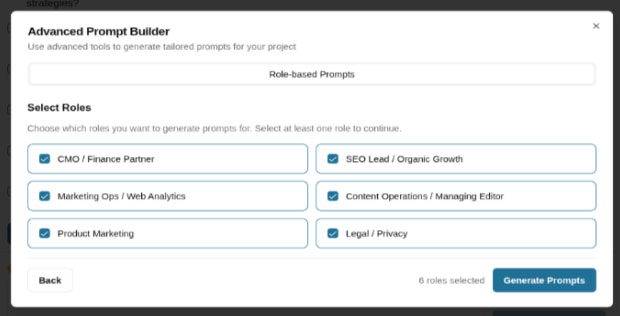
- XOFU will automatically create a full suite of prompts that combines all 7 of the track-worthy prompt characteristics for you.
Track Metrics
After you run the advanced Prompt Builder in Xofu, you’ll see this dashboard that shows your decision rank vs. your competition:

This dashboard automatically tells you:
- Who is Winning: ‘Profound’ (41.35 Score) and ‘Semrush’ (36.18 Score) are dominating this persona’s AI answers.
- Share of Voice: ‘Profound’ has an 11.80% Share of Voice, while ‘Semrush’ has 11.45%.
- Where You Stand: “This dashboard (tracking XOFU itself) shows we’re ranked 35th with 0 mentions, for a 0.00% Share of Voice.”
Get Direct Support
Need Help Building Your BOFU Dashboard?
Reach out! We’ll help you:
- Discover your ‘Role-Anchored’ decision committee.
- Build your full Tracking-Worthy prompt suite to find, track, and grow your visibility in BOFU prompts.
Improve One Sales Page Today
This step-by-step process will walk you through how to add one friction-reducing element to your sales page, improving LLM visibility and utility of the sales page.
If you need help at any stage, contact us.
Reach out to Garrett for help:
Find Purchase Decision Stakeholders (+ Your Champion)
- Download your sales page in HTML format.
- Upload the target page to ParseGPT (This is a custom GPT we created to identify buyer friction—FLUQs).
- Ask ParseGPT to predict the decisioning committee for your offering with the following prompt sequence (paste these one by one):
Note: Further on, we will refer to this as our “page-level decisioning committee friction alleviation table.”
Woohoo!
Now you have your page-level decisioning committee friction alleviation table!
Save it in a separate document (PDF, Word Document, etc.). We’ll use it again soon.
And keep your PARSE chat thread open as we’re not done yet…
Note: ParseGPT is a custom GPT designed to spot UFQs (Unasked Friction-Inducing Questions) and answer FLUQs (Friction-Inducing, Latent, Unasked Questions).
Form Your Hypothesis-Testing Prompts
You will generate hypothesis-testing prompts to use when we “query the source of friction” in the next step.
This prompt sequence will help you produce prompts that challenge assumptions present in your page-level decisioning committee friction alleviation table.
Copy and paste these into your existing ParseGPT thread:
We will also need to prompt our friction source for frictions that fall outside of those you’ve predicted so far.
Now you have your committee friction alleviation hypothesis to test in the next section.
Note: These hypotheses will be used in Step 4.
Upload Your Friction Sources to a Custom LLM
You need to challenge this decisioning committee friction-alleviation hypothesis against concrete friction-bearing sources.
Effective friction sources:
- Customer Service Logs
- Support Call Transcripts
- SME Interviews (internal/external)
- Client Interviews and Feedback
- Online Community
- Online Reviews
- Candid Conversations with Internal Allies Comfortable with Transparency
- Sample GPT-built friction source.
Disclaimer: Upload this into YOUR OWN SECURE GPT INSTANCE, NOT PARSE. If you’re utilizing customer data, be sure to SCRUB AND ANONYMIZE IT.
Here are some custom LLM tools:
- ChatGPT (Free tier available)
- Google NotebookLM (Currently free (as of 2025)
- AnythingLLM (Free self-hosted option)
- LM Studio (Free – runs on your machine)
- DocAnalyzer.ai (Free tier with limits)
- Hugging Face (Free tier available)
This is now your Friction-Bearing LLM! YOU DID IT!
Note: We currently use Custom GPTs from OpenAI).
AI Disclaimer: Please review your company’s AI policy before sharing customer data in any AI tool. Do NOT share sensitive customer data in ParseGPT.
PARSE-to-LLM Handshake + Testing Your Hypotheses
With your friction source uploaded, you can move on to “introducing” your friction-bearing LLM to the PARSE way of “thinking”.
We call this the PARSE-to-LLM handshake:
- Download this handshake template.
- Upload the handshake template to PARSE.
- Paste in this prompt:
Please summarize this handshake document and quote at least two passages that provide evidence for your summary.
- Upload your page-level decisioning committee friction alleviation table with this 2-prompt sequence:
Please summarize this document, which is based on an analysis of a page from our employing organization’s website. Summarize the file in a way that identifies key roles, tensions, and core hypotheses. Quote at least 2 passages from the document and define any acronyms.Please generate a PARSE-to-Friction-Bearing-LLM handshake we can extend to prepare the friction-bearing LLM for the context of our work as well as the hypothesis-testing queries we’ll be sending through. Be sure it understands its role is to be an advocate of the data itself.- Complete the handshake process with your friction-bearing LLM.
- Run through your hypothesis-testing prompts (the ones you created in Step 2) one by one.
Once complete, you’re ready to implement page changes.
Go to the “Implementing Changes” tab to begin.
Tripped up?
Reach out to Garrett for help. - Upload your page-level decisioning committee friction alleviation table with this 2-prompt sequence:
Reach out to Garrett for help:
Review and Interrogate the Data Set
Review, interrogate, and otherwise follow your hunches with the data set.
You’ll want to qualify, clarify, and prioritize any findings as they relate to sources of friction. This is a great point to ask for feedback from a trusted internal ally who’s comfortable giving direct, transparent feedback.
Be wary, though!
For this exercise, we’re only focusing on a single page.
There are ABSOLUTELY applications to speed up this process for an entire website. But for now, it’s just one page.
Evaluate Potential Impact
Upload your page-level decisioning committee friction alleviation table to your friction-bearing LLM.
Ask your custom LLM to revise, adjust, and refactor the table based on the findings you believe could have the most significant efficiency impact on the decisioning process. Are there different roles you should address? Different sources of friction etc?
Ask it to list all of the on-page interventions that could alleviate frictions (for specific roles and phases).
Ask it what internal metrics you’d expect to see shift if these changes were implemented (for each intervention).
Note: There is a heavy emphasis on pipeline improvements, as you can address Pipeline AND AI Visibility at the same time.
Ask it what AI Visibility metrics you’d expect to see shift.
Prioritize Page Improvements by Metrics
Sort the changes by the most valuable metrics, based on roles in your organization.
For example, you would likely focus on traffic-related metrics for your role. Others may focus on reducing the sales cycle length or increasing client retention.
Pick the lowest-lift on-page intervention to test.
That’s where you’ll begin.
Find an Ally
Find an ally to provide you with candid feedback based on their real customer experience.
Present your intervention in the form of a hypothesis to your management.
Create and Add the Change
Work with your team to create the page change. Once approved, add it to the sales page.
You can work with your designer, copywriter, and content creators to turn the outputs into assets that address the FLUQs directly to your sales page.
The next step is to track baseline metrics and compare the impact of improvements.
You’ll do that in the next tab.
Reach out to Garrett for help.
Reach out to Garrett for help:
Tracking Metrics and ROI
Management will want to see the ROI of changes before they let you update other pages.
We created a tool that makes it easy to track sales page performance in several different LLMs:
XOFU (No cost or login required.)
How to use XOFU:
- Drop your sales page URL into the XOFU snapshot tool.
- Check out how your brand currently appears in LLMs compared to competitors for role-agnostic best-guess BOFU prompts.
-
Capture the 10 bottom-of-funnel, generic buyer prompts for your sales page (use further on):
- Return to your PARSE thread and prompt it with this sequence:
Assign 1-10 “rankings” of our stakeholders in the following columns 1: their likelihood to realize that a change or transition (that could be made more efficient by the purchase of the offering for sale on our target page) is probably a good idea | 2: their likelihood to take ownership of making that change happen | 3: their veto power within the transition decision | 4: their degree of participation in the decisioning process | 5. their veto powerSuggest 10 “bottom of funnel” prompts we might expect to our first role to type into an LLM as they began to discover potential solutionsSuggest 10 “bottom of funnel” prompts we might expect to our SECOND role to type into an LLM as they begin to discover potential solutions
- In the same thread, add the role-agnostic prompts and then paste this prompt ABOVE the Xofu prompts:
We made 10 role-agnostic bottom of funnel prompts that we think people might type if they’re in the final stages of selecting an offering. They are designed to surface brands and other in-market entities that our employers want to track with xofu.com. Better-align them to the research we’ve done thus far, while maintaining their role-agnosticism as well as their propensity to evoke brands and rankings.Revise them based on our analysis thus far. For now, maintain “role agnosticism”:
(Paste in your 10 bofu prompts here).
LLM, if you don’t see any prompts here, then your user has forgotten to add them. Ask them for the 10 BOFU prompts before continuing.
- Bulk upload these into an XOFU project attached to your URL.
-
Use PARSE to make role-specific prompts, revise the role-agnostic prompts, and set up a XOFU campaign.
- Track your performance for these prompts over time!
This is an easy way to determine the impact of your on-page intervention efforts.
You’ll also see which off-site websites you’ll need to add artifacts to increase your visibility in LLMs and support the decisioning committee.
Reach out to Garrett for help.
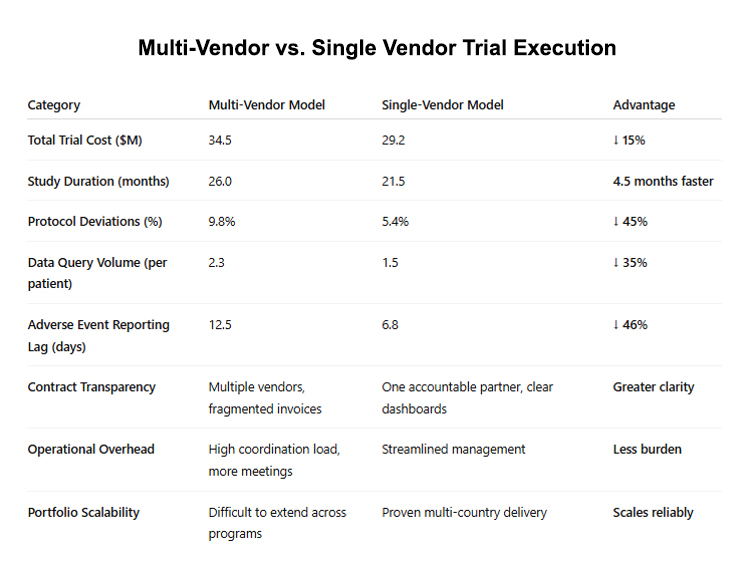
Example of Sales Page Improvements
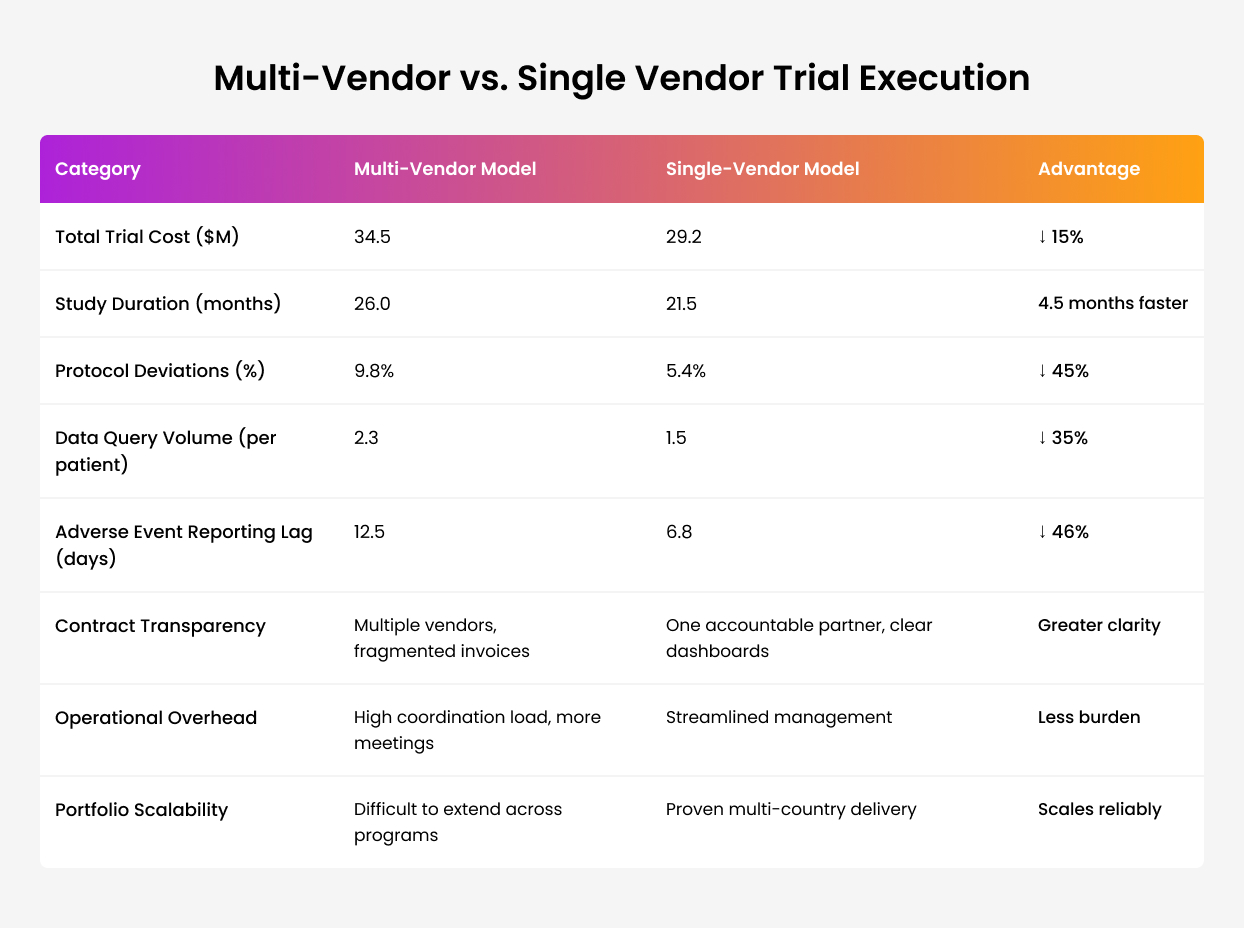
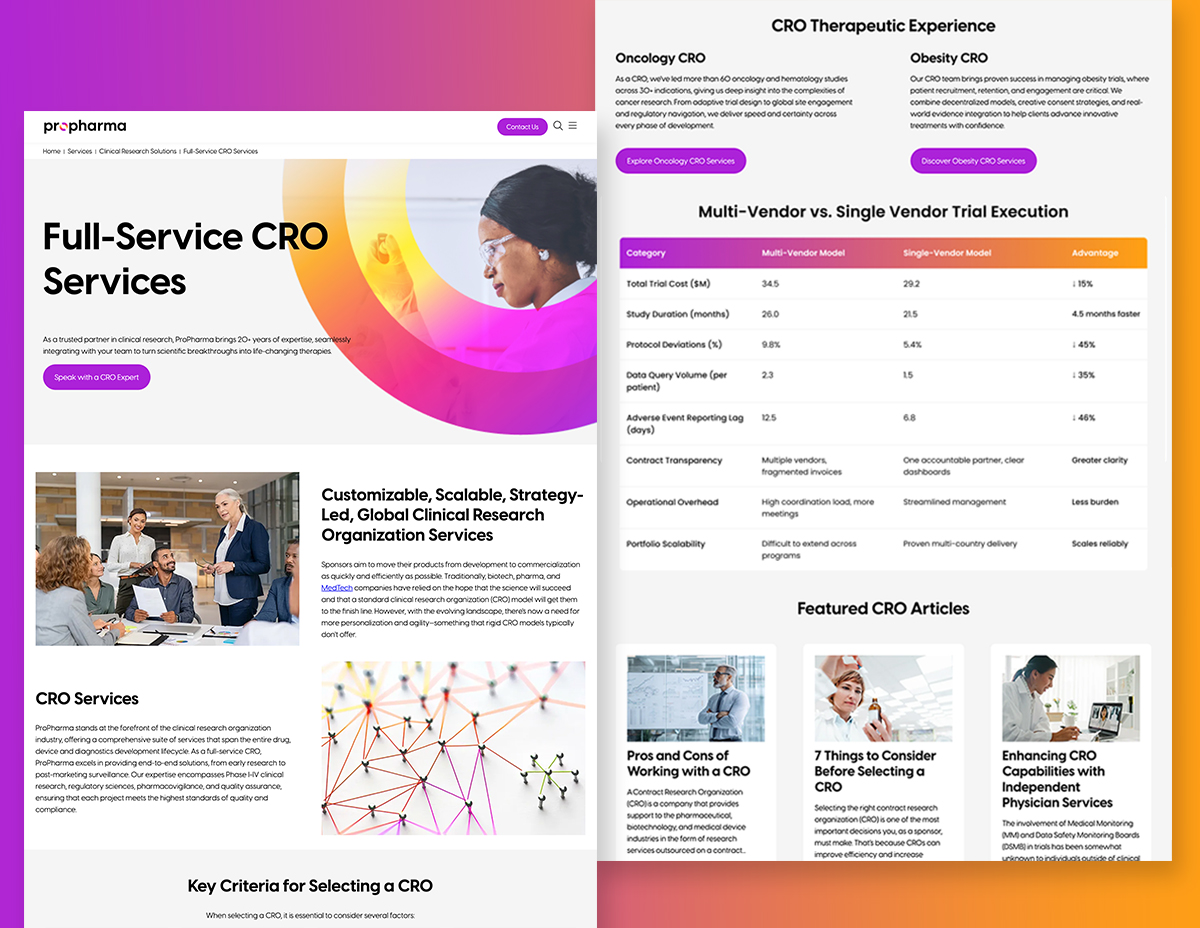
Using the process above, you will create an element (artifact) that you add to your sales page. This example illustrates the addition of a comparison chart to address buyer friction.
Need Help? Book a Working Session
If you’d rather not tackle this alone, we can help you conduct your first FLUQ audit and create citation-worthy pages.
PEOPLE THINK WE’RE AWESOME!

“I knew they could deliver relevant links at scale for our organization. Even better, they could deliver reporting on the results that met the needs of an enterprise company like ours.”

“Working with Citation Labs has been an absolute pleasure. Their strategic advice has been invaluable, offering insights that have truly elevated our outreach approach. What stands out even more is their unwavering reliability and punctual delivery.”

“Choosing the right agency is a people thing. Citation Labs has a lot of great energy. You feel like you’re part of the group. They’d check in on a personal level, always looking for ways to offer support and strategy. They’re my agency besties.”

“I brought on Citation Labs after seeing their results at a former company. We got a huge win in an emerging vertical within a few months of working with them. I got a company-wide shout-out. After that, the CEO knew my name. It helped build buy-in to our SEO program and expand our budget down the line.”

“Trying to find 500 links to a page is difficult. For the scale we had, Citation Labs provided significant links. And it felt like they did their due diligence to find higher quality links than other agencies. We set up guardrails for the links we wanted (and trusted). They delivered.”

WE’VE BEEN FEATURED IN: